How to get alerts when a member of Congress files a stock trade
Filings appear at unpredictable hours and the official sites have no notifications. Here is how to be first to know, and how to avoid drowning in noise.
Why alerts, not browsing
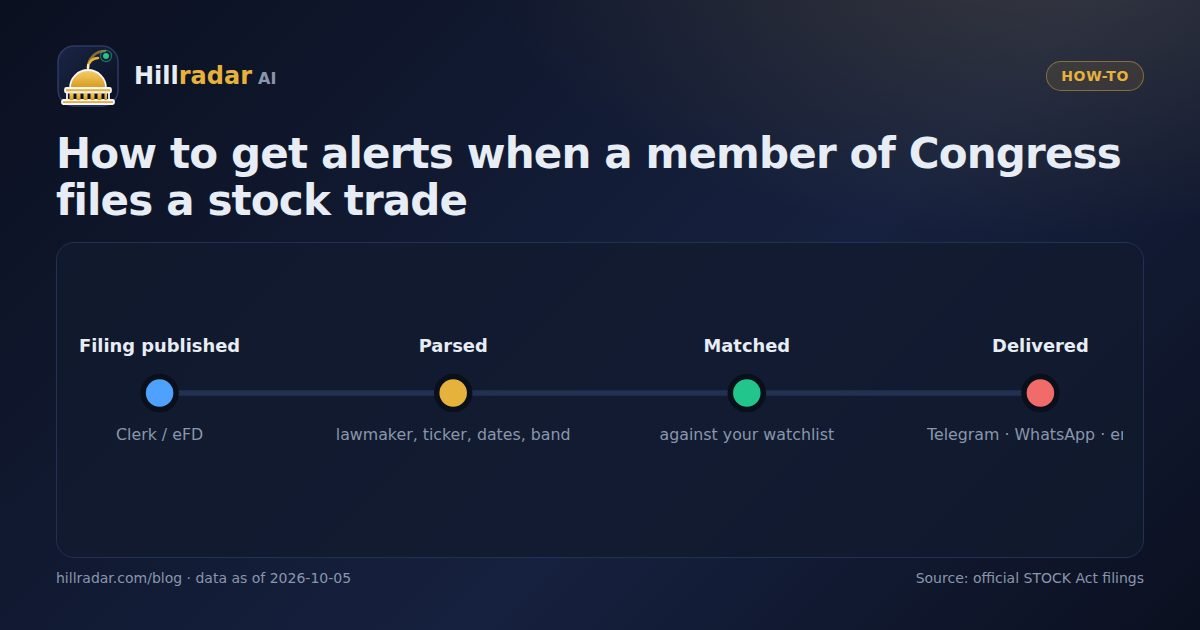
The House Clerk and Senate eFD sites publish filings as they are processed, with no feed, no email and no search by company. The Hillradar AI database refreshes several times a day; in the last 90 days alone it added 1,397 transactions. Nobody can watch that by hand, so the practical answer is a watchlist plus a channel you already look at.
Step 1: decide what you want to hear about
- A lawmaker — every filing they make. Best for your own representative or senator, or a committee chair relevant to your work.
- A company — any lawmaker trading a stock you follow. Best for investors and sector journalists.
- Activity clusters — when two or more lawmakers file trades in the same company within weeks of each other. Best if you only want the unusual.
Step 2: connect a channel
- Telegram — in Settings, click Connect Telegram, send the one-time code to the bot, and the channel shows as connected within seconds. Fastest and most reliable on phones.
- WhatsApp — add your number in international format. Delivery depends on the WhatsApp provider configured on the server.
- Email — add an address; good for a daily record you can search later.
Tick Trade alerts, Signal alerts or both, press Send test, and you are done.
Step 3: know what an alert contains
BUY · NVDA NVIDIA Corporation
Rep. Example Member (R-TX) · House
Amount: $15,001–$50,000 · Owner: joint
Traded 2026-09-02 · Filed 2026-09-30 (28 days)
Also bought by 3 other lawmakers in the last 45 days
Every alert carries the transaction type, the company and ticker, the lawmaker with party and chamber, the amount band, the owner code, both dates with the delay in days, and a link to the filing's record. Cluster alerts add how many other lawmakers filed in the same company recently.
Step 4: control the noise
- Follow companies rather than very active lawmakers if you want fewer messages; a managed account can produce 30 filings a day.
- Set a minimum amount band on watchlist alerts to skip $1K–$15K rebalances.
- Use cluster alerts as your default and lawmaker alerts for a handful of people you genuinely track.
- Alerts are only sent for filings published in the last 30 days, so historical imports never flood you.
What an alert is not
An alert is a notification that a public record was published. It is not a recommendation, and the trade it describes is typically weeks old by law. Use it to read the record first, not to act on it blind. The Disclaimer covers this in detail.
Ready to set one up? Create a free account, add a watchlist item and connect Telegram in about two minutes.
How many alerts to expect
The database added 1,397 transactions in the last 90 days, about 107 a week, from 128 active members. Following the single most active lawmaker could mean dozens of messages on a rebalancing day; following one large-cap company such as Apple means a message every few days; following clusters only means a handful a month. Start narrow. Most users settle on cluster alerts plus two or three companies or lawmakers they genuinely care about.
Choosing between Telegram, WhatsApp and email
Telegram is the fastest to set up and the most reliable for instant delivery, and the bot keeps a scrollable history. WhatsApp suits people who do not use Telegram, with the caveat that delivery depends on the provider configured on the server and template rules can delay messages. Email is best as a searchable archive and for teams, where a shared inbox can receive every alert. You can enable all three at once; each alert is delivered to every connected channel.
A simple workflow for busy readers
- Enable cluster alerts and set a minimum band of $15,001 on watchlist alerts.
- When an alert arrives, open the record and check the owner code, the delay in days and whether the buyer usually holds the stock.
- If it is interesting, open the company page to see the other lawmakers trading it and the dates.
- Save anything you want to revisit by exporting to CSV at the end of the week.
The whole loop takes two minutes per alert and keeps you working from the primary record rather than from someone else's summary of it.
Frequently asked questions
Are congressional trade alerts free?
On Hillradar AI, setting up channels and a one-item watchlist is free; delivery of alerts is part of the Pro plan ($497 per year), which also unlocks the full history, unlimited watchlist and CSV export.
How fast after a filing does an alert arrive?
Within minutes of the filing appearing in our feed, which refreshes several times a day. The alert always shows the original trade date next to the filing date so you can see how old the trade is.
Can I get alerts only for large trades?
Yes. Watchlist alerts can be limited by amount band, and activity-cluster alerts only fire when several lawmakers file in the same company within a short window.
Hillradar AI republishes public STOCK Act disclosures for research and education. Figures come from the official filings as collected in our database on the date shown; filings can be amended by the filer. Nothing here is investment advice.